
Mixpanel and Looker are two prominent players in the analytics tools landscape, each serving distinct purposes but sharing the common goal of helping businesses leverage data for better decision-making.
Main Purposes:
- Mixpanel: Primarily designed for product analytics, Mixpanel allows users to track user interactions with web and mobile applications. It focuses on event tracking and user engagement, enabling companies to understand how users interact with their products.
- Looker: A business intelligence (BI) tool, Looker is tailored for data exploration and reporting. It provides organizations with the ability to analyze data from various sources, facilitating deeper insights and collaborative reporting.
Reasons for Popularity: Users often choose Mixpanel for its strong emphasis on user behavior analytics, particularly in tech-centric companies aiming to optimize user experience. Looker attracts users for its robust data modeling capabilities, enabling organizations to create comprehensive visualizations and reports across different datasets.
Primary Comparison Aspects:
- Features: Mixpanel boasts sophisticated event-tracking and cohort analysis, while Looker offers advanced data modeling and customizable dashboards.
- Pricing: Mixpanel’s pricing is based on data points and features utilized, while Looker typically employs a subscription model based on user count and implementation.
- Ease of Use: Mixpanel is known for its user-friendly interface designed for product teams, whereas Looker may require more technical proficiency to unlock its full potential.
This comparison will guide users in evaluating which tool aligns better with their specific analytical needs.
Mixpanel VS Looker: Which tool is the most popular?
| Tool | Number of Reviews | Average Rating | Positive Reviews | Neutral Reviews | Negative Reviews |
|---|---|---|---|---|---|
| Mixpanel | 57 | 3.89 | 46 | 3 | 8 |
| Looker | 20 | 4.50 | 19 | 1 | 0 |
Mixpanel is the most popular tool based on the number of reviews, with 57 total reviews. However, it has a lower average rating of 3.89. In contrast, Looker, while having fewer reviews at 20, boasts a higher average rating of 4.50, indicating greater user satisfaction. Mixpanel has 46 positive reviews, but also 8 negative reviews, reflecting a mix of experiences. Looker, on the other hand, received no negative feedback, showcasing a strong preference among its users. Overall, while Mixpanel is more frequently reviewed, Looker exhibits stronger user satisfaction.

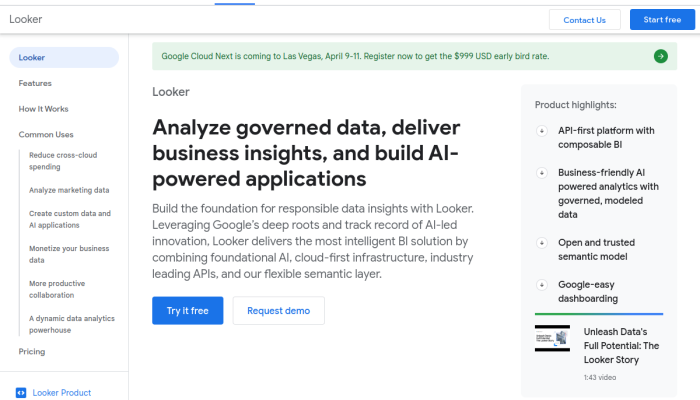
Mixpanel and Looker: Quick Comparison Overview
| Feature | Ahrefs | SEMrush |
|---|---|---|
| Primary Features | – Site Explorer | – Domain Overview |
| – Keyword Explorer | – Keyword Research | |
| – Content Explorer | – Site Audit | |
| – Rank Tracker | – Backlink Analytics | |
| – Site Audit | – Social Media Tools | |
| – Clustering Tool | – Advertising Research | |
| – Backlink Checker | – Organic Research | |
| Target Audience | – SEO professionals | – Marketers & Advertising Specialists |
| – Content marketers | – Small to large businesses | |
| – Agencies | – E-commerce sites | |
| – Bloggers | – Content creators | |
| Main Advantages | – Rich backlink database | – Comprehensive all-in-one tool |
| – Strong focus on SEO tools | – Extensive keyword database | |
| – User-friendly interface | – Great competitor analysis | |
| – Excellent for site audits | – Versatile reporting features | |
| – Strong tracking capabilities | – Advanced PPC research | |
| Core Value Proposition | Detailed SEO analysis and backlink profile tracking, ideal for optimizing website visibility. | A complete digital marketing suite that covers SEO, PPC, and social media analytics for comprehensive strategy development. |
| Ideal Use Cases | – Analyzing competitor backlinks | – Running multi-channel digital marketing campaigns |
| – Finding keyword opportunities | – Tracking pay-per-click strategies | |
| – Performing in-depth site audits | – Monitoring social media performance | |
| – Crafting content strategies based on SEO data | – Conducting market research and analysis |
Most liked vs most disliked features of Mixpanel and Looker
| Feature | Mixpanel | Looker |
|---|---|---|
| Most Liked | – Comprehensive analytics capabilities provide insights into user behavior and product performance. | – Simplifies navigation and report creation for users, enhancing accessibility. |
| – Accessible user interface enables straightforward onboarding for users with varying technical skills. | – Effective tools for creating clear and informative dashboards. | |
| – Real-time tracking allows for immediate decision-making and effective campaign monitoring. | – Seamless integration with Google tools enhances workflow efficiency. | |
| – Segmentation features facilitate effective categorization and targeted marketing. | – Users can tailor dashboards and reports to meet specific needs. | |
| – Responsive customer support aids users when issues arise or guidance is needed. | – Automatic data importing provides up-to-date reporting for timely business decisions. | |
| Most Disliked | – Complexity of the interface can overwhelm inexperienced users, creating a steep learning curve. | – New users may struggle with navigation, making full utilization daunting. |
| – Perception of high pricing is a concern for small businesses and startups. | – Reports of lags or freezing when handling complex datasets hinder productivity. | |
| – Absence of auto-save feature and limitations in user management noted as drawbacks. | – Lack of robust data transformation capabilities restricts data manipulation before visualization. | |
| – Support resources considered inadequate, with a desire for more documentation and learning materials. | – Some interface elements appear simplistic, lacking advanced features compared to competitors. | |
| – Needs improved integration with other tools and services, with requests for additional features. | – Challenges in setting up and connecting data sources can be time-consuming and not straightforward. |
Key Features of Mixpanel vs Looker
Key Features of Mixpanel and Looker for Analytics Tools
Mixpanel
-
Event Tracking
- Benefit: Allows users to track specific actions (events) that users take within a product, providing insights into user behavior and engagement.
- Unique Aspect: Mixpanel’s event-based approach focuses on user actions, enabling a deeper understanding of user journeys.
-
Cohort Analysis
- Benefit: Users can create segments of their audience based on shared characteristics or behaviors, helping identify patterns and trends over time.
- Unique Aspect: Mixpanel offers advanced cohort analysis, allowing users to see how different groups of users engage with the product over specified periods.
-
Retention Analysis
- Benefit: Helps businesses understand how well they are keeping their users engaged over time. Users can see how many people return after their first experience.
- Unique Aspect: Mixpanel’s focus on retention allows companies to hone in on areas to improve user experience and increase long-term engagement.
-
A/B Testing
- Benefit: Provides the ability to experiment with different product versions to determine which variations perform better.
- Unique Aspect: Mixpanel offers robust A/B testing tools specifically designed for digital products, allowing data-driven decisions to enhance user experiences.
-
User Segmentation
- Benefit: Users can easily segment data according to demographics, behaviors, and other user attributes.
- Unique Aspect: The ease and flexibility of segmentation make Mixpanel particularly user-friendly for non-technical teams.
-
Dashboards and Reports
- Benefit: Users can create custom dashboards to visualize key metrics and insights relevant to their business objectives.
- Unique Aspect: Mixpanel emphasizes real-time data monitoring, giving teams up-to-date insights without needing manual refresh.
Looker
-
Data Exploration
- Benefit: Provides a user-friendly interface to explore and analyze data without needing extensive SQL knowledge.
- Unique Aspect: Looker is built around a strong modeling layer, allowing for flexible data exploration while maintaining consistency across reports.
-
LookML Modeling Language
- Benefit: Users can define their data structures and relationships in LookML, which allows for reusable and consistent analysis.
- Unique Aspect: This proprietary language enables advanced customization of analytics reports, benefiting technical users who want to maximize data usage.
-
Interactive Dashboards
- Benefit: Users can create visually appealing and interactive dashboards that facilitate data storytelling and decision-making.
- Unique Aspect: Looker’s ability to create embedded analytics, meaning dashboards can be integrated into other applications seamlessly, is a standout feature.
-
Data-Driven Alerts
- Benefit: Users can set up alerts for specific metrics or changes in data, ensuring they are informed about critical developments in real time.
- Unique Aspect: Looker’s integration with other business tools means alerts can trigger actions within those systems, making workflows more efficient.
-
Collaboration Features
- Benefit: Users can share insights and collaborate within the platform, promoting teamwork and more informed decision-making.
- Unique Aspect: Looker emphasizes collaboration, making it easier for teams to discuss insights right where the data lives.
-
Integration Capabilities
- Benefit: Looker offers extensive integrations with a wide range of data sources and business tools, enabling businesses to harness their data wherever it resides.
- Unique Aspect: Looker’s ability to connect directly to multiple databases allows users to analyze data in real time without the need for data duplication.
Summary
Mixpanel focuses heavily on understanding user actions through event tracking, retention, and cohort analysis, making it particularly beneficial for product-driven companies looking to optimize user engagement. Its real-time analytics and user-friendly interface are designed for quick insights.
On the other hand, Looker stands out with its robust data modeling capabilities via LookML, interactive dashboards, and strong collaboration features. It is an ideal choice for organizations looking to drive data-driven decision-making across teams while maintaining consistency in reporting and analysis.
Both tools offer unique features that cater to different analytical needs, making the choice between them dependent on the specific requirements of a business or project.
Mixpanel vs Looker Pricing Comparison
| Feature/Brand | Mixpanel Pricing | Looker Pricing |
|---|---|---|
| Free Tier | Free for up to 1,000 monthly tracked users, limited features. | No free tier available. |
| Starter Plan | – $25/month (billed annually) for 5,000 monthly tracked users. – Basic analytics features, data visualization, and mobile app integration. |
Pricing starts at approximately $3,000/month for up to 10 users, focused on data modeling and visualization capabilities. |
| Growth Plan | – $225/month (billed annually) for 50,000 monthly tracked users. – Unlocks advanced segmentation, cohort analysis, and increased API usage. |
$6,000/month for up to 20 users, includes enhanced analytics functionalities, data connections to various sources, and scheduling. |
| Enterprise Plan | Pricing is custom; includes unlimited tracked users, dedicated support, and advanced data governance features. | Custom pricing based on user count and additional features, such as advanced analytics, security, and onboarding support. |
| Trial/Discounts | 14-day free trial available for Growth and Enterprise plans. | Looker does not offer a free trial; demo available on request. |
| Billing Options | Monthly and annual billing, annual subscription offers a discount. | Monthly and annual billing, annual subscription may offer negotiation on pricing based on scale. |
Main Differences in Offerings:
- User Limits: Mixpanel has tiered pricing based on the number of tracked users, while Looker’s pricing is user-based with custom plans for larger teams.
- Feature Set: Mixpanel focuses heavily on user engagement analytics with actionable insights, whereas Looker emphasizes comprehensive data modeling and visualization as part of its data tooling.
- Free Tier Availability: Mixpanel offers a free tier for entry-level access, which Looker does not provide.
Notes:
- Pricing for both platforms can vary based on additional customizations, specific organizational needs, and ongoing promotions or discounts not explicitly listed on their pricing pages.
Support Options Comparison: Mixpanel vs Looker
| Support Option | Mixpanel | Looker |
|---|---|---|
| Live Chat | Available during business hours. | Not available. |
| Phone Support | Not provided. | Available for customers on premium plans. |
| Documentation | Extensive knowledge base, user guides, and API documentation. | Comprehensive documentation including user guides, API references, and FAQs. |
| Webinars | Offers recorded webinars covering various features and best practices. | Provides webinars and training sessions for users, focusing on product usage and best practices. |
| Tutorials | Video tutorials available to guide users through key features. | Includes tutorials and training resources aimed at helping users learn the platform efficiently. |
This comparison highlights that Mixpanel provides a robust documentation and tutorial framework with live chat support, while Looker offers limited chat support but includes phone support for premium customers, alongside extensive documentation and educational resources.
Unique Features of Mixpanel Vs Looker
| Feature | Mixpanel Unique Feature | Looker Unique Feature | Added Value | Potential Decision Factors |
|---|---|---|---|---|
| Event Tracking | Detailed event tracking and analysis | Integrated data exploration | Mixpanel allows for granular analysis of user behavior through event tracking, enabling businesses to understand specific actions taken by users. | Businesses needing minute insights into user engagement will find this feature crucial for optimizing user experience. |
| Cohorts | Advanced cohort analysis | Model-based analytics | Mixpanel provides detailed cohort analysis based on user behavior over time, helping to identify trends and retention rates. | Organizations focused on user retention and engagement can leverage cohort analysis for targeted strategies. |
| A/B Testing | Extensive A/B testing capabilities | Customizable dashboards | Mixpanel enables in-depth A/B testing to measure the effectiveness of changes in product features or marketing. | Companies relying on evidence-based decisions for product development and marketing can benefit significantly from this feature. |
| Data Integration | Simplified data integration processes | Semantic modeling | Mixpanel allows users to integrate data from various sources easily, streamlining the analytics workflow. | Businesses that require seamless data integration to avoid siloed information will find this feature essential. |
| User Segmentation | Rich user segmentation options | Interactive data visualization | Mixpanel’s segmentation helps unlock insights by targeting specific user groups based on behavior or attributes. | Organizations focused on personalized marketing will find advanced segmentation valuable for tailored messaging. |
| Retention Reports | Automated retention reports | Integrated data governance | Mixpanel offers automated retention reports to show how well businesses keep their users engaged. | Companies aiming to maintain a loyal user base will find automated reports instrumental in refining their strategies. |
| Funnel Analysis | Flexible funnel analysis | Interactive dashboard features | Mixpanel’s funnel analysis provides flexibility to adapt funnels based on specific business needs, revealing conversion paths. | Companies wanting to visualize user journeys in adaptive ways can significantly improve their marketing and sales strategies. |
| Notifications | Real-time notifications for user behavior | Collaboration features | Mixpanel alerts stakeholders about crucial user behavior changes in real time, facilitating swift action. | Organizations needing timely responses to user interactions will prioritize having real-time notifications in their analytics toolkit. |
| Experimentation | Experimentation framework | Data exploration workflows | Mixpanel includes a structured approach to testing hypotheses regarding user behavior and product features. | Teams focused on experimentation will find this framework essential for driving innovation and product improvements. |
Both Mixpanel and Looker offer distinctive features that enhance analytics capabilities in ways traditional analytics tools may not cover. As companies evaluate these platforms, the specialized features can serve as pivotal elements in deciding which tool aligns best with their strategic goals.

